Orange County CAD – Property Search, Records & Appraisal District | Texas
Looking for accurate property records in Orange County, Texas? Whether you are buying a home in Orange, checking land near Vidor, Bridge City, or Port Arthur area, or verifying taxes in Deweyville or Mauriceville, the official Orange Central Appraisal District (OCAD) has the most reliable information you need. You can view current owner names, 2026 appraised values, exemptions, land details, and flood zones — all free and without any login.
This practical guide gives you exact, step-by-step instructions that work on the real OCAD website. It includes real local examples, time-saving tips, and insights from people who live and work in Orange County every day. Follow along and you will get the information you need in minutes.
What This Guide Helps You Do
Here’s exactly what you can accomplish with this page:
Homestead Exemption Savings Calculator
Property Tax Calculator
Taxable Value After Exemption
Monthly Property Tax
Total Annual Cost (Tax + Insurance)
Property Investment ROI
- Find any property by address, owner name, or account number in seconds
- See the official 2026 appraised value and compare it with last year
- Check if the homestead exemption is applied correctly
- Download or print a clean property card for your realtor, lender, or title company
- Use the GIS map to compare nearby properties and check flood zones
- Prepare everything needed before the May 15 tax protest deadline
- Understand flood risks near the Sabine River, Neches River, and coastal areas
Quick Links to the Official Orange County Tools
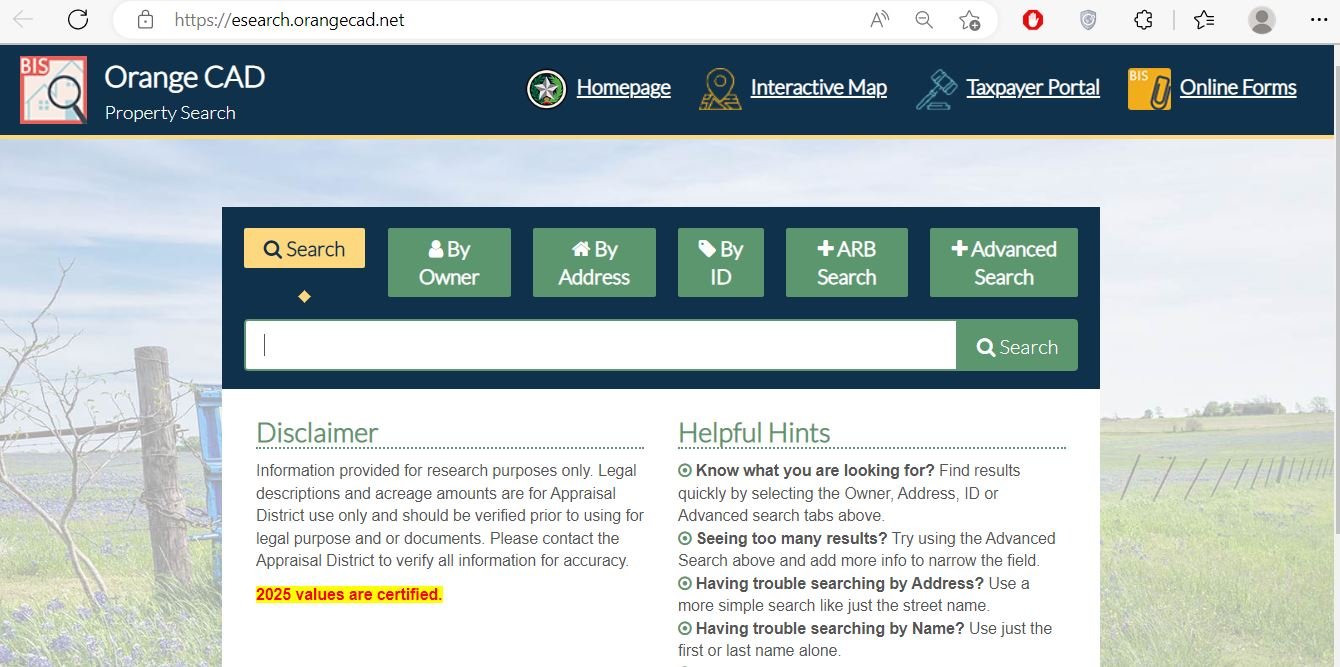
Official Orange Central Appraisal District (OCAD) website:Orange CAD Property Search
Property Search (start here): https://esearch.orangecad.org/
Interactive GIS Map & Parcel Viewer: https://orange.trueautomation.com/mapSearch/?cid=110
Pay taxes or print your bill here: https://www.co.orange.tx.us/page/tax-assessor-collector
How to Search by Address – The Way Most People in Orange Do It
- Go to https://esearch.orangecad.org/
- Click the Address tab
- Type the house number and street name only (example: 1234 W Division Avenue Orange). Do not add the city name.
- Click the blue Search button
- Click the correct property from the results
- Check the owner name and mailing address at the top
- Scroll down to see the 2026 appraised value (shown in green) and all details
- Click Print or the PDF icon at the top right to save a clean copy
How to Search by Owner Name
- Click the Owner Name tab
- Type last name first (example: Smith John)
- If too many results appear, add the city or use Advanced Search
- Click the matching parcel and review the full record
How to Search by Property ID / Account Number (Fastest Method)
- Click the Account Number tab
- Paste the full account number from your tax bill
- Click Search — you get the exact property instantly
How to Use the Orange County Interactive GIS Map
- Go to https://orange.trueautomation.com/mapSearch/?cid=110
- Zoom in to Orange, Vidor, Bridge City, or any rural area
- Click any colored parcel on the map
- A pop-up appears with basic info and a link to the full card
- Switch to Aerial view to see the actual house, yard, or land
- Turn on the flood zone layer — very important near the Sabine River or coastal areas
How to Read the Full Property Card
Once the card opens, focus on these key sections:
- Owner & Mailing Address — confirm it is current
- 2026 Appraised Value — the big green number used for taxes
- Exemptions — look for “HS” (homestead)
- Sales History — useful for buyers and estate planning
- Map Tab — aerial photo and flood information
What You Need Before Starting
- Any device with internet
- The street address, owner name, or account number
- 10–15 quiet minutes
Common Problems & Quick Fixes
Too many results? Add the city name or search only the street name first.
Nothing shows up? Try different spellings of the last name — common in smaller towns like Vidor.
Value looks high? Pull three similar properties on the GIS map for comparison.
Need to pay taxes? Go straight to the tax office link above.
Local Tips & Tricks from Orange County Residents
- Search before 9 am — the site loads much faster.
- Properties near the Sabine River or coastal areas can have flood risks. Always check the flood layer in the GIS map before buying.
- Print your card every January and keep a folder — it makes tax protests easier.
- If “HS” homestead is missing and you live there full-time, call the office immediately. Many locals in Bridge City and Vidor have saved money this way.
- Real estate agents in Orange often use the “Comparable Sales” tab — ask yours to show it.
- Keep the PDF saved with the address and year in the filename for easy future reference.
Simple Tax Protest Checklist
- Print your current property card
- Use the map to print three similar nearby properties
- Take clear photos of any repairs or issues
- File your protest online before May 15
Important Notes
This guide is provided by County-CAD.us. We are not part of the Orange Central Appraisal District or any government office. We only link to the official public websites so you can access accurate information quickly.
Property values and records can change. Always verify the latest information directly on the official OCAD website.
Orange County CAD Office Address & Contact:
11475 FM 1442
Orange, TX 77630
Phone: (409) 745-4411
Monday–Friday, 8:00 AM – 5:00 PM
Google Maps Location of Orange County CAD Office
FAQs About Orange County CAD Property Search
How do I search property in Orange County Texas?
Go to https://esearch.orangecad.org/ and use the Address, Owner Name, or Account Number tab. It takes less than a minute.
Is the Orange County CAD search really free?
Yes – 100% free forever. No signup, no login, and no payment is ever needed.
Where do I actually pay my property taxes?
Use the Tax Office at https://www.co.orange.tx.us/page/tax-assessor-collector. The CAD only shows values.
How do I know if I have the homestead exemption?
Look for “HS” on the right side of the property card. If it is missing and you live there full time, contact the CAD office before April 30.
Does the interactive GIS map show flood zones?
Yes. Turn on the flood zone layer. This is especially important near the Sabine River or coastal areas.
How current is the data on the Orange County CAD website?
Values are updated once a year. The card always shows the exact appraisal date so you know it is current.
Can I use the property search on my phone?
Yes. It works well on mobile. Pinch to zoom on maps and values.
How do I prepare for a tax protest in Orange County?
Print your current card, gather three comparable properties from the GIS map, take photos of any issues, and file before May 15.
Does the CAD show previous owners and sales history?
Yes. Scroll to the bottom of any property card. Great for buyers and estate planning.
What should I do if I cannot find my property?
Try different spellings of the owner name or search only the street name first. Many locals in Orange resolve this with one small change.