Shasta County property records, assessment inquiry, tax bills and recorder search guide
Use this guide to search Shasta County property assessment records, understand assessment numbers and fee parcel numbers, check assessed values, find tax payment records, locate deed documents, and contact the correct official office in Redding.
The phrase “Cade Johnson Shasta County CAD” appears to be a search-term style page title, not an official Shasta County department name. Shasta County does not use a Texas-style Central Appraisal District. The correct official office is the Shasta County Assessor-Recorder, and the main property lookup is the Online Assessment Inquiry.
Quick answer: where to search Shasta County property records
For assessed value, owner/mailing information, exemptions and property characteristics, start with the official Shasta County Online Assessment Inquiry. The portal works best when you have the assessment number or fee parcel number from a tax bill or official county record.
For tax payment status, use the Treasurer-Tax Collector search. For deeds, recorded documents and ownership instruments, use the Recorder Self Service portal. This split matters because the Assessor does not collect tax payments and the Tax Collector does not decide assessed value.
Quick navigation
How to search Shasta County property assessment records step by step
The Online Assessment Inquiry is useful when you need assessment values, owner/mailing information, exemptions or property characteristics. The biggest search problem is usually not the portal itself; it is using the wrong number or entering a number in the wrong format.
Shasta County property search screenshot: what to look for
The existing image from the old post is useful because it shows the official Shasta County assessment inquiry style page with a “Find Property” box and search dropdown. Use it as a visual guide only. Always click the live official portal for current data.
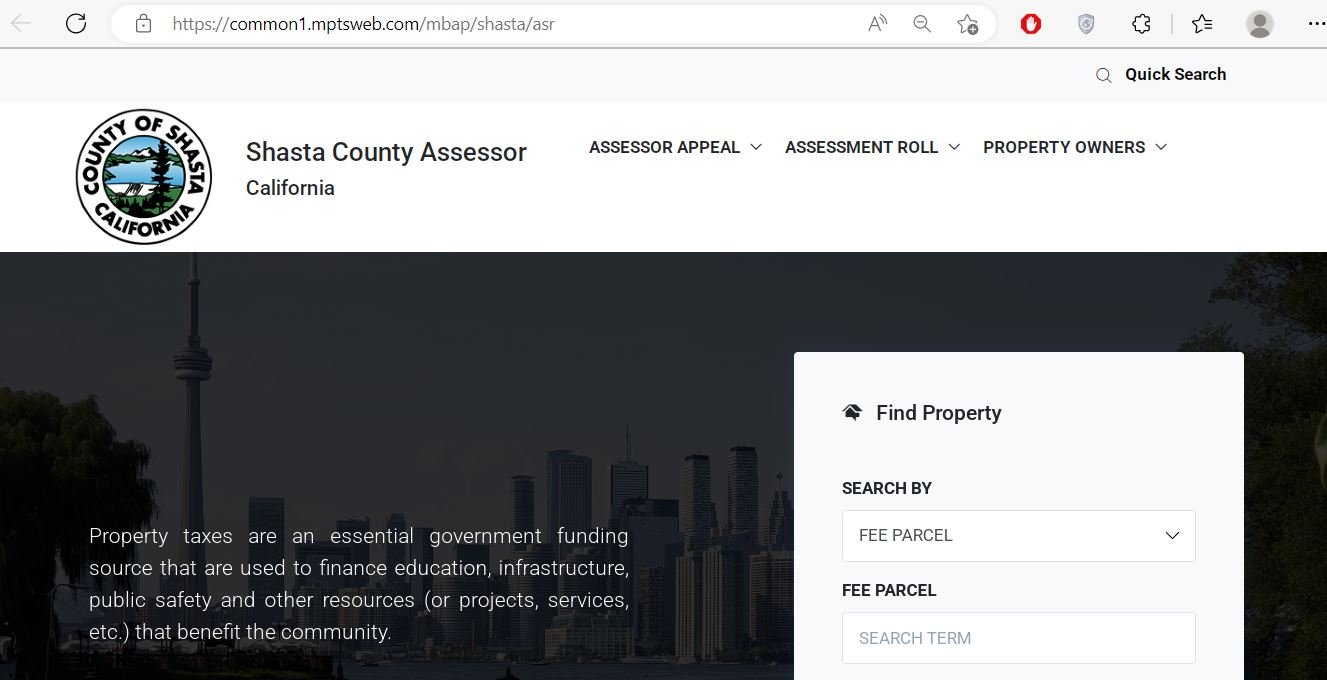
- Recognising the correct portal layout
- Finding the search type dropdown
- Understanding where the assessment or fee parcel number goes
- Explaining the process to a family member or client
- Current assessed value
- Current tax balance
- Appeal deadlines
- Deed or ownership proof
Assessment number vs fee parcel number in Shasta County
Shasta County users often get stuck because assessment number and fee parcel number are not the same thing in every task. The assessment number is useful for the assessment inquiry. The fee parcel number is commonly used for tax searches and payment-related lookup.
| Number type | Best use | Where to find it |
|---|---|---|
| Assessment number | Full assessment inquiry, assessed values, exemptions and property details | Property tax bill, assessment notice, prior county record, or by asking the Assessor with the address. |
| Fee parcel number | Tax bill search and payment-related lookup | Tax bill, Tax Collector search, escrow documents or parcel-related records. |
| APN / parcel reference | GIS map context, deeds, title review and location verification | Assessor record, GIS map, recorded documents or tax bill. |
What you can verify on a Shasta County assessment record
A Shasta County assessment record can help homeowners, buyers, insurers, agents and lenders understand taxable value and property details. It should not be treated as a title report, survey or final tax receipt.
| Record field | What it means | What to check before acting |
|---|---|---|
| Owner / mailing information | Current assessment record ownership and mailing details | Recent deeds can take time to reflect; use Recorder records for legal document confirmation. |
| Land value | Assessed value assigned to the land portion | Review acreage, parcel location, access, wildfire impact and land-use context. |
| Improvement value | Assessed value assigned to buildings and improvements | Important after remodels, fire damage, demolition, major repair or new construction. |
| Total assessed value | Assessment value used in the tax process | Tax bill still depends on tax rates, special assessments and payment status. |
| Exemptions | Homeowners’, disabled veterans’ or other applicable exemption status | Missing exemption can affect tax burden; confirm with official Assessor forms and deadlines. |
| Property characteristics | Basic county data about the parcel or improvements | If square footage, condition or building details look wrong, prepare proof before contacting the office. |
Shasta County Assessor vs Tax Collector vs Recorder
Using the wrong office is the fastest way to waste time. Use the Assessor for assessment records and value questions, the Tax Collector for bills and payments, and the Recorder for deeds and official recorded documents.
| User need | Correct source | Best action |
|---|---|---|
| Assessed value, exemptions, property characteristics | Shasta County Assessor-Recorder | Use Online Assessment Inquiry or call 530-225-3600. |
| Tax bill, balance, payment, receipt | Treasurer-Tax Collector | Use the official tax search/payment portal or call 530-225-5511. |
| Deeds, liens, recorded ownership documents | Recorder Self Service / Recorder office | Search recorded documents or contact Recorder resources. |
| GIS parcel location and map context | Shasta County GIS / maps resources | Use GIS map tools for orientation, not as a legal survey. |
| Assessment appeal | Assessor / Assessment Appeals process | Review value, gather evidence and follow county appeal instructions. |
How to prepare for a Shasta County assessment appeal
If your assessed value appears wrong, focus on value evidence, property-condition proof, disaster impact, comparable sales or record errors. Do not argue only that your tax bill is high, because the assessment appeal process is about assessed value and assessment correctness.
Wildfire, calamity and property damage checks
Shasta County property owners may need assessment help after wildfire, storm, structural damage or other calamity. If a structure was damaged, destroyed or removed, do not assume the assessment record automatically reflects the current condition.
- Improvement value
- Building description
- Land vs improvement split
- Exemption status
- Mailing address for notices
- Insurance claim documents
- Photos with date
- Contractor repair estimate
- Permit or demolition record
- Fire/calamity documentation
- Is calamity relief available?
- Which form is required?
- What deadline applies?
- Will value update automatically?
- How should documents be submitted?
Where to find Shasta County deeds and recorded documents
Assessment records help you identify a parcel, but recorded documents are different. If you need deeds, liens, ownership instruments, recorded maps or document history, use the official Recorder Self Service portal.
- Deeds
- Liens and releases
- Recorded ownership documents
- Document numbers
- Recording dates
- Public recorded instruments
- Get APN or assessment number
- Know owner names if possible
- Know approximate recording date
- Check the property address
- Remember certified copies may require official request/payment
Local Shasta County property-search tips
Shasta County has city properties, rural parcels, mountain/lake-area properties, wildfire-affected neighborhoods, unincorporated land and parcels near Redding, Anderson, Shasta Lake and Burney. Use local context when comparing values.
- Check assessed value and exemptions before tax season
- Confirm improvement value after remodels
- Use Tax Collector portal for payment status
- Save PDFs for escrow or insurance review
- Check APN and map context carefully
- Verify access, acreage and land characteristics
- Use Recorder records for deed history
- Do not rely on map view as legal survey
- Check improvement value after damage
- Keep claim and repair documents
- Ask about calamity/fire guidance
- Update mailing address if displaced
Common Shasta County property-record mistakes to avoid
Most user frustration comes from using a Texas “CAD” mindset on a California county, searching with the wrong number, or confusing assessment records with tax bills and recorded deeds.
| Mistake | Why it causes trouble | Better action |
|---|---|---|
| Looking for a Shasta County CAD office | California counties generally use Assessor offices, not Texas-style CADs. | Use the Shasta County Assessor-Recorder website. |
| Using assessment inquiry as tax payment proof | Assessment records do not prove taxes are paid. | Use the Treasurer-Tax Collector search for bills and receipts. |
| Searching with the wrong number | Assessment number, fee parcel number and APN can be used differently. | Check your tax bill and choose the correct search type. |
| Treating GIS as a legal survey | GIS is for reference, not boundary certification. | Use recorded maps, surveys and title professionals for legal boundary issues. |
| Ignoring fire or damage changes | Improvement values may not match current condition. | Document damage and contact the Assessor about calamity/fire guidance. |
Documents and details to keep ready
Before you contact Shasta County, search tax bills, check recorded documents or prepare an assessment appeal, keep the right information ready. It makes the process much faster.
Related County-CAD.us property guides
These related guides may help if you are comparing California assessment systems, county property portals, or how our editorial sourcing is handled.
Shasta County property office contact details
| Office | Official details | Use this for |
|---|---|---|
| Shasta County Assessor-Recorder | 1450 Court Street, Suite 208, Redding, CA 96001 · 530-225-3600 · Toll-free 1-800-479-8009 | Assessment inquiry, property values, exemptions, appeals, forms and recorder-related routing. |
| Treasurer-Tax Collector | 1450 Court Street, Suite 227, Redding, CA 96001 · 530-225-5511 | Tax bills, payment search, receipts and online payment questions. |
| Recorder Self Service | Official online recorded-document portal | Recorded deeds, liens, document search and public recorded instruments. |
Video note for Shasta County property records
I could not verify a strong official YouTube video specifically for Shasta County’s assessment inquiry or property search process. Because of that, this rewrite does not embed a weak or unrelated video. Use the official links in this guide for the most reliable step-by-step action.
Shasta County Assessor-Recorder office map
Use this map for directions to the Assessor-Recorder office in Redding. If you are going for an assessment appeal, document copy, exemption issue or records question, call first and confirm current office procedure.
Official Shasta County property resources
Use these official resources for final confirmation before making tax, assessment, appeal, deed or payment decisions.
Shasta County Assessor official page Official Online Assessment Inquiry information Official Shasta County Online Assessment Inquiry portal Official Shasta County property tax search/payment portal Official Shasta County Recorder Self Service portal Official Shasta County assessment appeal information Official Shasta County Assessor forms Official Shasta County Maps and GISShasta County property search FAQs
What is the official Shasta County CAD website?
Shasta County does not use a Texas-style CAD website. The correct official source is the Shasta County Assessor-Recorder website, and the main lookup tool is the Online Assessment Inquiry.
Why does this page mention Cade Johnson Shasta County CAD?
“Cade Johnson Shasta County CAD” appears to be a search phrase used in the old page title. It is not the official name of a Shasta County property office. Users searching it usually need the Shasta County Assessor property search.
How do I search Shasta County property records online?
Open the official Online Assessment Inquiry, choose the correct search type, enter your assessment number or fee parcel number, and open the matching record to view assessment details.
Can I search Shasta County property by address?
The assessment portal works best with assessment or fee parcel numbers. If you only have an address, check your tax bill, GIS tools, escrow documents or contact the Assessor-Recorder for help locating the correct number.
What is the Shasta County Assessor phone number?
The Shasta County Assessor-Recorder phone number is 530-225-3600. The toll-free number listed by the county is 1-800-479-8009.
Where is the Shasta County Assessor-Recorder office?
The office is located at 1450 Court Street, Suite 208, Redding, CA 96001.
Where do I pay Shasta County property taxes online?
Use the official Shasta County Treasurer-Tax Collector property tax search/payment portal. The tax portal lists the Treasurer-Tax Collector office at 1450 Court Street, Suite 227, Redding, CA 96001, phone 530-225-5511.
Where do I find Shasta County deeds and recorded documents?
Use the Shasta County Recorder Self Service portal for deeds, liens, recorded documents and public recorded instruments. Assessment records are not the same as recorded legal documents.
How do I appeal a Shasta County assessment value?
Review your assessment record, gather property-specific evidence, check official assessment appeal guidance and follow the current county deadline. Evidence may include comparable sales, photos, repair estimates, appraisal reports or disaster documentation.
Is the Shasta County assessment inquiry free?
Basic online assessment inquiry access is available through the official county-linked portal. Certified copies, recorded documents or special services may have separate fees through the proper county office.
Last editorial check: June 2026. Official details, portals, deadlines, payment rules and office procedures can change without notice; verify directly with the relevant Shasta County office before acting.
Estimate Taxes, Exemptions, Escrow, Protest Savings and Next Steps
This sitewide tool helps homeowners, buyers, sellers and investors understand property tax numbers before they check the official county appraisal district or tax office. It runs in your browser, does not collect personal data and gives practical next steps after each calculation.
What are you trying to do today?
Choose your main goal. The tool will guide you to the right calculation or next step.
Use Tax, Exemption and Protest tabs to understand your appraisal notice and possible savings.
Use Buyer Budget and Monthly Escrow before relying only on a mortgage payment estimate.
Property Tax Estimate Calculator
Estimate annual tax using property value, assessment ratio, exemptions and local tax rate.
Homestead and Exemption Savings
Estimate how much a homestead, senior, disabled, veteran or local exemption may reduce annual tax.
Monthly Escrow / Ownership Cost
Estimate monthly property tax, insurance, HOA and reserve cushion. Useful for buyers and homeowners comparing affordability.
Property Tax Protest Savings
Estimate possible savings if your appraised value is reduced after a protest, evidence review or correction.
Appraised Value Growth / Cap Impact
Estimate how a value increase or appraisal cap may affect taxable value. Rules vary by state, county and exemption status.
Home Buyer Monthly Budget Estimate
Estimate a more realistic monthly ownership cost by adding mortgage, property tax, insurance and HOA.
Find Official County CAD and Tax Resources
Enter county and state to create safe search links. This avoids guessing official URLs and helps users find the correct county appraisal district, property search, tax payment and exemption pages.
Why this tool helps your site
It gives visitors an interactive reason to stay on the page, calculate their own numbers and move from general reading to practical action.
Best placement
- Below county CAD articles
- Before FAQ section on long posts
- Inside sidebar or after first major section on desktop
Estimate disclaimer
Values are educational estimates. Visitors should confirm final values, exemptions, tax rates, payment status and deadlines with official county resources.