Orange County CAD jobs, career page, property search and appraisal district guide
This guide helps you check current Orange County Appraisal District job openings, contact the correct CAD office, understand what appraisal district staff actually do, and use the official Orange CAD property search, online forms, taxpayer portal, GIS map and protest resources.
Official correction: the Orange CAD career page currently lists positions as “N/A,” so do not trust outdated job reposts or third-party hiring snippets without checking the official career page first. If your goal is property search, tax payment or protest help, use the separate official tools explained below.
Quick answer: how to check Orange County CAD jobs
To check Orange County CAD jobs, open the official Orange CAD Career Opportunities page. As of this editorial check, the page shows no current openings. If a position appears later, follow the application instructions shown on the official page only.
If you reached this page because you searched “Jobs Orange County CAD property search,” use the official Orange CAD property search to find appraisal records, and use the Orange County Tax Office for tax bills or payments. The CAD does not collect taxes; it appraises property and manages appraisal roll records.
Quick navigation
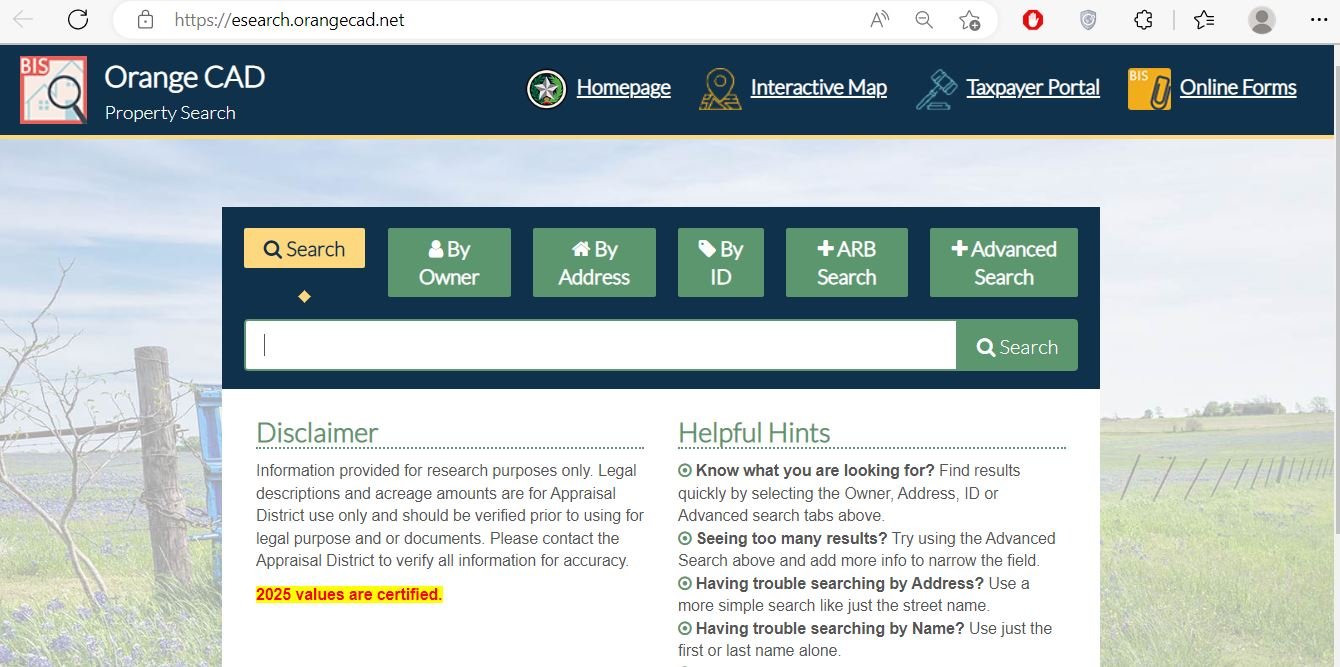
Orange CAD screenshot: where users usually start
The existing post included a screenshot of the Orange CAD property search interface. I am reusing it here because it helps users recognise the official eSearch screen before they enter owner name, address, property ID or ARB search details.
How to check Orange County CAD career opportunities
Orange CAD has a dedicated official career page. At the time of this update, the page shows no available positions. Still, it is useful to know how to monitor it safely because appraisal districts may post openings for office, appraisal, mapping, administrative or customer-service roles when staffing needs change.
What types of work may exist at an appraisal district?
Even when Orange CAD has no current openings, job seekers often want to understand what kind of work appraisal districts do. Orange CAD’s mission is to discover, list and appraise property in the district accurately, ethically and uniformly. That work can involve records, appraisal, customer service, mapping, forms and taxpayer support.
| Possible work area | What the role may involve | Helpful skills |
|---|---|---|
| Customer service / front desk | Helping property owners with records, forms, exemptions, ownership questions and office routing. | Clear communication, patience, records accuracy, phone etiquette and basic property-tax understanding. |
| Appraisal support | Assisting with property data, value review, field notes, appraisal records and property characteristics. | Attention to detail, local property knowledge, spreadsheet use and willingness to learn Texas appraisal rules. |
| GIS / mapping support | Working with parcel maps, location data, neighborhood codes and map-related property questions. | GIS basics, map reading, address matching, parcel research and data quality control. |
| Exemption/forms processing | Reviewing forms for homestead, over-65, disabled person, disabled veteran and other exemption-related workflows. | Document review, accuracy, confidentiality and knowledge of official form requirements. |
| ARB/protest season support | Helping with protest records, hearing support, evidence routing and taxpayer communication during busy appraisal season. | Organization, deadline tracking, respectful communication and ability to handle high-volume public questions. |
How to use Orange CAD property search if you are here for records
The old post mixed “jobs” with property search. This version keeps both intents clear. If you are not looking for employment and only need property records, start with the official Orange CAD eSearch tool.
Orange CAD vs Orange County Tax Office vs County Clerk
Many users contact the wrong office. The appraisal district is not the tax collector and the tax office is not responsible for setting appraised value. Use the table below before calling.
| User needs | Correct office/resource | What to do there |
|---|---|---|
| Find property value, owner, exemption or appraisal record | Orange County Appraisal District | Use property search, online forms, exemption pages or contact Orange CAD. |
| Apply for homestead or other exemptions | Orange CAD | Use official exemption pages and online forms, then confirm requirements with CAD. |
| File a value protest | Orange CAD / ARB process | Use online protest or official protest guidance and provide evidence. |
| Pay property taxes or print a bill | Orange County Tax Assessor-Collector | Use the county tax office or tax payment portal for payment, receipts and balances. |
| Find recorded deeds or legal ownership documents | Orange County Clerk / official records | Use official county records resources, title company support or legal-document search tools. |
Orange CAD protest and ARB help
If your property value looks too high, focus on evidence. The appraisal district handles value, appraisal records and exemption issues. The tax office handles billing and payment. A protest should explain why the appraised value is wrong or unequal, not only why the tax bill feels expensive.
- Comparable sales near your property
- Photos of damage or poor condition
- Repair estimates
- Recent appraisal or closing statement
- Proof of incorrect property details
- Is the value preliminary or certified?
- Is homestead applied correctly?
- Is square footage correct?
- Is land or improvement value unusual?
- Is the property near flood-prone land?
- “My taxes are too high” only
- Random Zillow screenshots
- Unrelated low-value properties
- Old sales from another market period
- Unsupported low-value requests
Orange CAD exemptions and online forms
If you own and live in the property, check exemption status before focusing only on a protest. A missing homestead, over-65, disabled person or disabled veteran exemption can matter more than a small value adjustment.
Local tips for Orange County CAD users and job seekers
Orange County property records can involve homesteads, rural land, business personal property, mobile homes, minerals, coastal/flood-sensitive parcels and industrial-area properties. Use the correct official tool for your situation.
- Check the official career page first.
- Do not send documents to unknown emails.
- Learn basic Texas property-tax terms before applying.
- Prepare customer-service and records examples.
- Save the property ID for faster calls.
- Check exemptions before protest season.
- Use online forms instead of random PDFs.
- Print your record before filing a protest.
- Check flood and map context.
- Verify tax bills separately.
- Use appraisal data as research, not title proof.
- Compare similar properties carefully.
Common mistakes to avoid on this Orange CAD page
The old page focused mainly on property search even though the URL suggests jobs. This replacement handles both search intents clearly and avoids misleading users about current openings.
| Mistake | Why it causes trouble | Better action |
|---|---|---|
| Assuming jobs are open because a third-party page says so | The official career page may show no current positions. | Check Orange CAD’s official career page before applying. |
| Using CAD site to pay taxes | CAD handles appraisal; the Tax Office handles payment. | Use Orange County tax payment resources for bills and receipts. |
| Searching address with too many words | Extra city names or abbreviations can hide the right record. | Use simple street name, owner name, ID or advanced search. |
| Trusting preliminary values as final | Current-year values may be preliminary and subject to change. | Confirm certification/status and use official records for deadlines. |
| Protesting without evidence | ARB review needs facts, not only opinion. | Prepare photos, comparable sales, repair estimates and record-error proof. |
Documents and details to keep ready
Whether you are checking jobs, searching property records, filing forms or preparing a protest, having the right details ready saves time.
Related County-CAD.us guides
These related guides can help users compare different county appraisal and property-search workflows. Always remember that office names, deadlines and online tools can differ by county and state.
More property-search guides
Internal link note
Use related county guides for workflow comparison only. Texas CAD rules, Pennsylvania assessment rules and Tennessee assessor processes are not the same.
Orange County Appraisal District contact details
| Contact item | Official detail | Use it for |
|---|---|---|
| Office name | Orange County Appraisal District | Jobs, appraisal records, property search, exemptions, online forms and protest routing. |
| Address | 9157 IH 10 E, Orange, TX 77630 | Office visit planning, maps and mailed/in-person questions where allowed. |
| Mailing address | P.O. Box 457, Orange, TX 77631 | Official mailed documents if Orange CAD instructions allow mail submission. |
| Phone / Fax | (409) 745-4777 / (409) 745-4112 | Calling the office, confirming career status, appraisal questions and procedure routing. |
| info@orangecad.net | General non-urgent questions; avoid sending sensitive documents unless instructed. | |
| Hours | Monday–Friday, 8:00 AM–5:00 PM | Call or visit during office hours; check holiday notices first. |
Orange CAD office map
Use this map for planning a visit to Orange County Appraisal District. If you are visiting for employment questions, appraisal records, exemptions or protest matters, call before going so you know what documents to carry.
Helpful Orange CAD video and taxpayer resource section
I could not verify a strong official YouTube video specifically for Orange CAD jobs. Because the official career page currently shows no openings, adding a random job video would not help users. For appraisal and protest education, Orange CAD provides a helpful videos/resources page with homeowner and small-business ARB guidance.
Official Orange County CAD resources
Use these official pages for final confirmation before applying, searching records, filing forms, protesting values or paying taxes.
Orange County Appraisal District official website Orange CAD official Career Opportunities page Orange CAD official contact/request form Orange CAD official property search Orange CAD official online forms Orange CAD official interactive map Orange CAD online protest portal Orange CAD homestead exemption page Orange County property tax payment portal Orange County Tax Assessor-Collector property tax pageJobs Orange County CAD FAQs
Are there any Orange County CAD jobs open right now?
The official Orange CAD Career Opportunities page currently lists “Positions Currently Available: N/A.” Check the official page again later because hiring status can change.
Where should I check official Orange CAD job openings?
Use the official Orange CAD Career Opportunities page at orangecad.net. Avoid relying only on third-party job snippets because they may be outdated or unrelated.
What is the Orange County Appraisal District phone number?
The main Orange CAD phone number is (409) 745-4777. The office also lists fax number (409) 745-4112 and email info@orangecad.net.
Where is Orange County Appraisal District located?
Orange County Appraisal District is located at 9157 IH 10 E, Orange, TX 77630. The mailing address listed by the district is P.O. Box 457, Orange, TX 77631.
What does Orange County Appraisal District do?
Orange CAD develops and administers property and appraisal roll records, appraises property for ad valorem tax purposes, manages exemptions, supports protest processes and provides property search resources.
How do I search Orange County CAD property records?
Use the official Orange CAD property search at esearch.orangecad.net. You can search by owner, address, ID, ARB search or advanced search, then confirm the correct property record.
Does Orange CAD collect property taxes?
No. Orange CAD handles appraisal values and records. The Orange County Tax Assessor-Collector and property tax payment portal handle tax bills, balances, receipts and payments.
How do I apply for an Orange CAD homestead exemption?
Use Orange CAD’s official homestead exemption page or online forms. Confirm eligibility, required documents and filing instructions directly with Orange CAD before submitting.
How do I protest my Orange County property value?
Use Orange CAD’s online protest resources or official protest instructions. Prepare evidence such as comparable sales, condition photos, repair estimates, closing documents and proof of incorrect property details.
Is County-CAD.us affiliated with Orange CAD?
No. County-CAD.us is an independent information guide and is not affiliated with Orange County Appraisal District, Orange County Tax Office or any government agency.
Last editorial check: June 2026. Official hiring status, property data, tax records, deadlines and office procedures can change without notice; verify directly with Orange CAD before applying, filing, paying or visiting.
Estimate Taxes, Exemptions, Escrow, Protest Savings and Next Steps
This sitewide tool helps homeowners, buyers, sellers and investors understand property tax numbers before they check the official county appraisal district or tax office. It runs in your browser, does not collect personal data and gives practical next steps after each calculation.
What are you trying to do today?
Choose your main goal. The tool will guide you to the right calculation or next step.
Use Tax, Exemption and Protest tabs to understand your appraisal notice and possible savings.
Use Buyer Budget and Monthly Escrow before relying only on a mortgage payment estimate.
Property Tax Estimate Calculator
Estimate annual tax using property value, assessment ratio, exemptions and local tax rate.
Homestead and Exemption Savings
Estimate how much a homestead, senior, disabled, veteran or local exemption may reduce annual tax.
Monthly Escrow / Ownership Cost
Estimate monthly property tax, insurance, HOA and reserve cushion. Useful for buyers and homeowners comparing affordability.
Property Tax Protest Savings
Estimate possible savings if your appraised value is reduced after a protest, evidence review or correction.
Appraised Value Growth / Cap Impact
Estimate how a value increase or appraisal cap may affect taxable value. Rules vary by state, county and exemption status.
Home Buyer Monthly Budget Estimate
Estimate a more realistic monthly ownership cost by adding mortgage, property tax, insurance and HOA.
Find Official County CAD and Tax Resources
Enter county and state to create safe search links. This avoids guessing official URLs and helps users find the correct county appraisal district, property search, tax payment and exemption pages.
Why this tool helps your site
It gives visitors an interactive reason to stay on the page, calculate their own numbers and move from general reading to practical action.
Best placement
- Below county CAD articles
- Before FAQ section on long posts
- Inside sidebar or after first major section on desktop
Estimate disclaimer
Values are educational estimates. Visitors should confirm final values, exemptions, tax rates, payment status and deadlines with official county resources.